
To receive notifications from rotorsoft via SMS, you can either (if the SMS gateway of your rotorsoft system is activated) store a mobile phone number in your address book entry or store a mobile phone number as an email address in the form of MOBILENUMBER@sms.rotorsoft.io. The format of MOBILENUMBER is [INT. DIALING CODE][DIALING CODE][PHONE NUMBER], e.g. 491731234567, so that the email address in this case would be 491731234567@sms.rotorsoft.io.
The corresponding entry must then be defined as an alert destination (symbol behind the mobile phone number/email address entry in the address book).
Once you are linked to an alert group and a message is sent to this alert group, you will receive the notification via SMS on your mobile device.
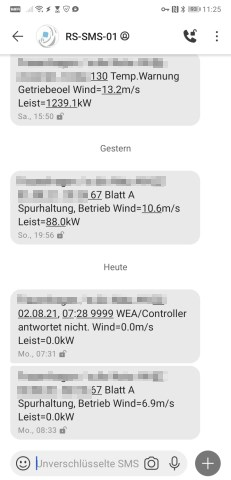
⚠ The free SMS service via sms.rotorsoft.io does not guarantee availability and may be discontinued at any time. We recommend using your own SMS gateway. If you have any questions about this, please contact our support team.