
In order for opti.node to communicate with rotorsoft, the access data you have set up for opti.node must be entered under Third-party systems.
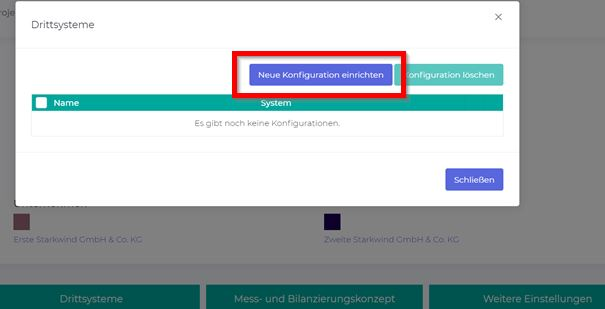
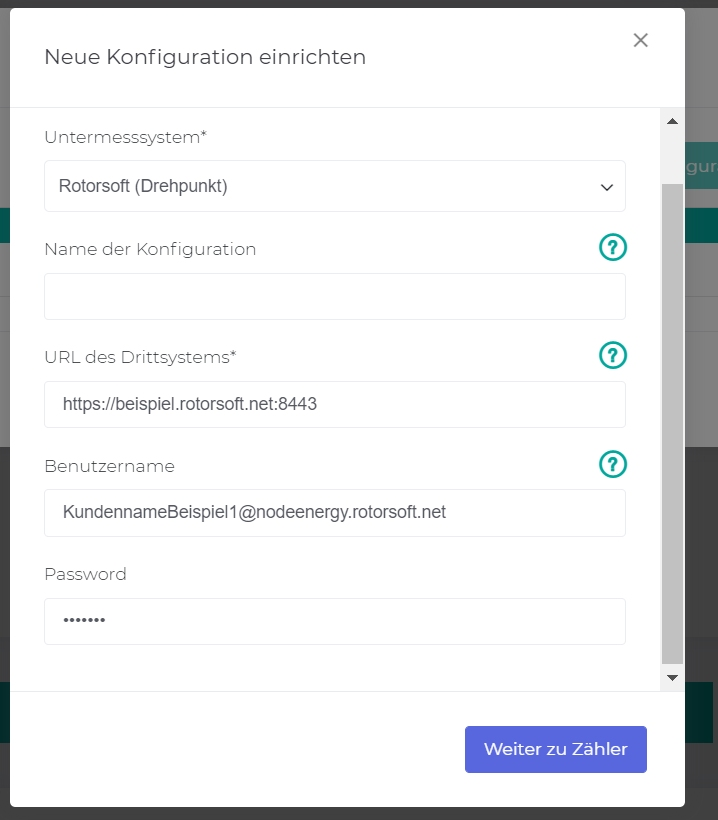
In the Set up new configuration window, you must now enter:
- Sub-measurement system “rotorsoft”
- URL of the third-party system
- User name
- Password
The URL is the internet address you enter to log into the rotorsoft system, whereby “/desktop” at the end of the internet address must be removed.
Examples
Do you log into your rotorsoft system at https://demo.rotorsoft.net/desktop?
Then the URL of the third-party system is https://demo.rotorsoft.net
Do you use the address https://beispiel.rotorsoft.net:8443/desktop for your rotorsoft login?
Then the URL of the third-party system is https://beispiel.rotorsoft.net:8443
Afterwards, node.energy may need to make an adjustment in the security settings of opti.node.
Please contact your opti.node sales partner for assistance with this.